
Deleting Authorizations
- When You Can Delete an Authorization
- When You Can't Delete an Authorization
- Why This Is Expected
- Frequently Asked Questions
Overview
Authorizations can only be deleted while they're in Draft status. Once an authorization moves beyond Draft, for example, after it's submitted, it becomes a permanent record and can no longer be deleted.
This is expected behavior, and it's designed to protect the accuracy of your authorization history and reporting
When You Can Delete an Authorization
An authorization can be deleted only while it's in Draft status.
To delete an authorization:
- Open the Authorization Table View
- Click anywhere on the draft authorization's row.
- The side panel will open.
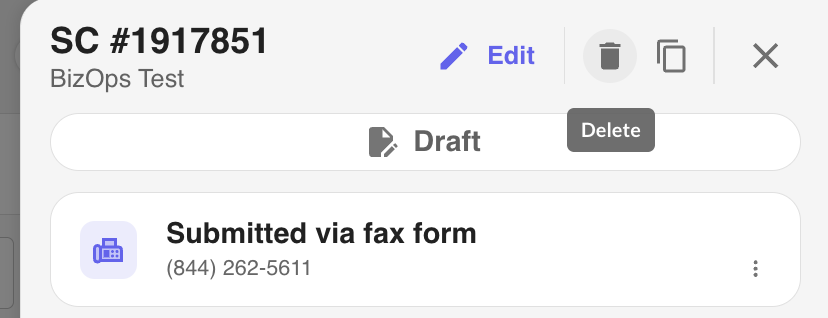
- Select Delete.
Deleting the draft permanently removes the authorization. This action cannot be undone.
When You Can't Delete an Authorization
Once an authorization leaves Draft status, it can no longer be deleted. This includes authorizations in any of the following status:
- Submitted
- In Progress
- Approved
- Denied
- Voided
- Any other non-draft status
Why This Is Expected
Restricting deletion after submission helps preserve:
- Authorization history
- Operational reporting and analytics
- Workflow integrity
- Auditability of actions taken on an authorization
Because work has already been done on these authorizations, they are treated as permanent records.
Frequently Asked Questions
- I accidentally submitted a test authorization. Can I delete it?
- No. Once an authorization is no longer in Draft, it cannot be deleted.
- I don't see a delete button. Why?
- This usually means the authorization has already left Draft status. The Delete option is only available for authorizations that are still in Draft.
- Where do I find the Delete option?
- Open the authorization from the Table View by clicking anywhere on its row. If it's still in Draft, you'll see the Delete action (trash can icon) at the top of the side panel
We're here to guide you through your prior authorization quest!

Was this article helpful?
That’s Great!
Thank you for your feedback
Sorry! We couldn't be helpful
Thank you for your feedback
Feedback sent
We appreciate your effort and will try to fix the article